
LendPro offers two kiosk models, the freestanding Mi Model and the countertop J-Model, or retailers can run LendPro on their own tablet or terminal. LendPro is not a lender. Lenders make all credit decisions and set all terms.
Key takeaways
- LendPro kiosks are in-store devices preloaded with the LendPro financing application and configured for each location.
- LendPro offers the freestanding Mi Model and the countertop J-Model, and retailers can also run LendPro on their own tablet or terminal.
- Shoppers type their own details on the kiosk, so financing information is not read aloud across the counter.
- Kiosk data is encrypted in transit, and LendPro holds a SOC 2 report.
What does a LendPro financing kiosk do?
A kiosk puts the LendPro application on your sales floor or in your office. Each kiosk comes preloaded with the LendPro financing application, configured for your location, so applications are tied to the right store from day one. LendPro uses a financing flow configured for each location based on the lenders assigned to that location and the requirements of those programs. Contact LendPro to review configuration changes.
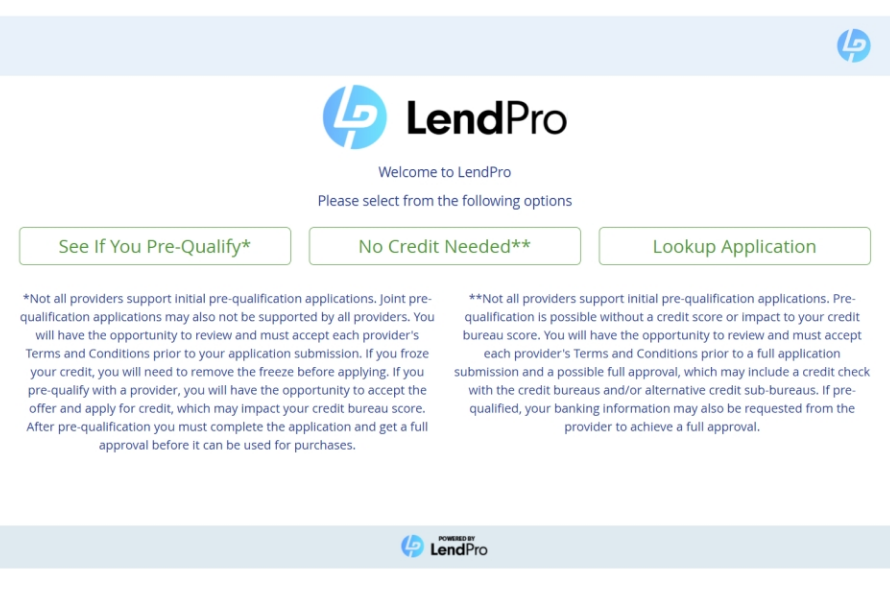
The shopper taps See If You Pre-Qualify or No Credit Needed and types their own details. Nothing is read aloud across the counter. One application reaches the lenders in your lineup, drawn from 18+ lenders and 25+ lending programs, and the shopper sees results on screen once lenders respond. Where the provider supports pre-qualification, it uses a soft pull and won't affect credit scores. A lender may run a hard inquiry if the shopper accepts an offer.
Kiosks are one of several entry points, along with product pages and the cart, QR codes, text links and a hosted application launched from your POS. Configure financing for each sales channel. Online and in-store lender availability, application requirements, and results may differ. LendPro works with the retailer to establish the appropriate configuration for each channel. See embedded pre-qualification.
Which kiosk models does LendPro offer?
| Spec | Mi Model | J-Model |
|---|---|---|
| Type | Freestanding, the largest LendPro model | Countertop all-in-one |
| Height | About 49 inches | Not specified |
| Build | Steel and aluminum, high-gloss white painted front and back panels | Lightweight, portable within the store |
| Device and screen | Apple iPad, many generations, with 9.7, 10.2 or 12.9 inch screens | Self-contained Windows PC with a 15 inch touch screen |
| Connection | Wireless network | Direct LAN, or optional wireless configuration |
| Care | Easy to clean and disinfect | Not specified |
Specifications as published by LendPro. Ask LendPro for current pricing, availability and supported iPad generations.
Can I use my own tablet instead of a kiosk?
Yes. Retailers can run LendPro software on their own tablet or terminal.
We will walk through your lenders, tiers and entry points in a live demo.
How does a shopper use a financing kiosk?
- The shopper starts on the kiosk. They choose See If You Pre-Qualify, or No Credit Needed when the store offers it. A returning shopper can use Lookup Application.
- Pre-qualified offers appear. Offers from more than one provider can show side by side, or follow your waterfall order if that setting is on.
- The associate joins the conversation. "You pre-qualified for up to $3,000, subject to the lender's final approval. Let's find what fits."
- The shopper selects an offer and completes that provider's full application. It may ask for employment, debit card and/or bank details. The shopper agrees to the provider's terms and submits.
- The associate finalizes the sale in LendPro. Invoice, e-sign in store or by text or email link, then settlement on delivery.
Illustrative example. A pre-qualified amount is subject to the lender's final approval and is not a guarantee of approval. Not all providers support pre-qualification. If a shopper chooses No Credit Needed, the provider's full application may include a check with the credit bureaus and/or alternative credit sources.
How are LendPro kiosks secured and supported?
- Encrypted communications. Data is encrypted in transit. Application data is shared with the lenders reviewing the application and with service providers that process it under LendPro's privacy notice.
- Remote monitoring. Kiosks run remote monitoring and support software.
- Online support. Full-time online service supports the devices.
- SOC 2. LendPro holds a SOC 2 report.
Qualified prospects can request LendPro's security documentation through their LendPro representative. Details are on the security page.
Where should a store place a financing kiosk?
A common starting point is to place the kiosk where shoppers pause: near the entrance, beside high-ticket displays, or in a waiting area. In a medical or dental office, the waiting room or consult room works well. In a phone store, place it beside the device wall. Keep the screen angled away from foot traffic for privacy. Put the kiosk where an associate can see it, so they can step in once offers appear and help the shopper choose.
- Signage. A short line such as "See if you pre-qualify on this kiosk."
- Power and network. Plan for a wireless connection for the Mi Model, and LAN or wireless for the J-Model.
- Associate script. Train staff to invite shoppers to the kiosk early, not after they hesitate.
LendPro's go-live SLA is 10 business days. Timing depends on lender activation and integration scope, and custom integrations take longer. LendPro confirms the start date and prerequisites during onboarding.
Bring your current lenders. We will show how LendPro would be configured for your stores.
Which retailers use financing kiosks?
Kiosks and tablets work across the categories LendPro serves: furniture, medical and dental, phones and electronics, jewelry, auto service and home improvement. Book a demo to ask about kiosks for your stores.
Frequently asked questions
Do LendPro kiosks come preloaded?
Yes. Each kiosk comes preloaded with the LendPro financing application, configured for its location.
What is the difference between the Mi Model and the J-Model?
The Mi Model is a freestanding kiosk about 49 inches tall that holds an Apple iPad. The J-Model is a countertop all-in-one Windows PC with a 15 inch touch screen.
Can I run LendPro on my own tablet?
Yes. Retailers can run LendPro software on their own tablet or terminal instead of a LendPro kiosk.
Does applying on a kiosk affect a shopper's credit score?
Where the provider supports pre-qualification, it uses a soft pull and won't affect credit scores. A lender may run a hard inquiry if the shopper accepts an offer.
How much does a LendPro kiosk cost?
LendPro does not publish kiosk pricing. Contact LendPro for current pricing and availability.
Is the kiosk connection secure?
Yes. Communications are encrypted, kiosks run remote monitoring and support software, and LendPro holds a SOC 2 report.