
LendPro is not a lender, so questions about approvals, payments or your account go to the lender or lease provider named in your agreement.
Key takeaways
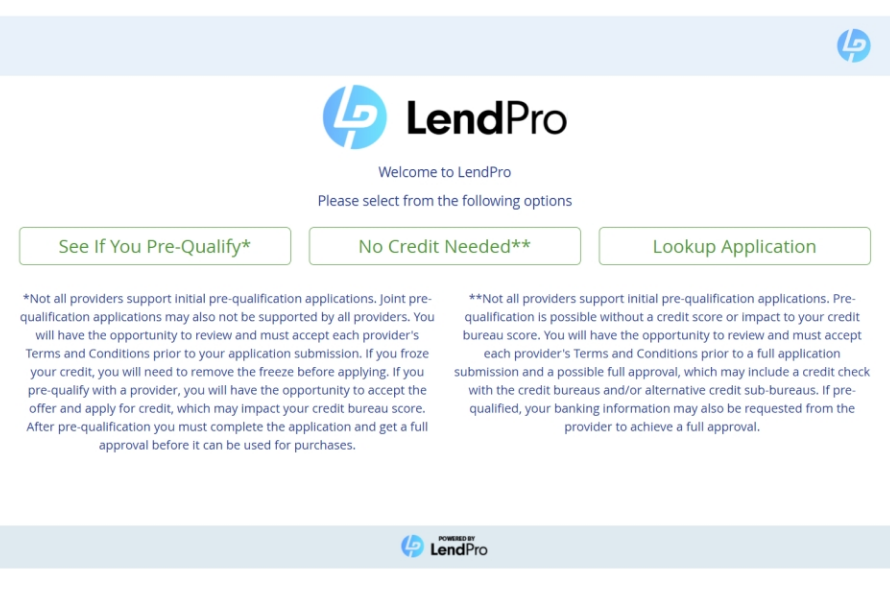
- To check or continue an application, open the same store's LendPro application and choose Lookup Application.
- Questions about your order or delivery go to the store, and questions about approvals, payments or your account go to the lender or lease provider named in your agreement.
- LendPro is not a lender and cannot see or change your account.
- For trouble using the application, contact LendPro at info@mylendpro.com or (434) 202-0137.
How do I find an application I already started?
- Go back to the same store's application. Use the store's financing page, the kiosk or QR code in the store, or the text link an associate sent you.
- Choose Lookup Application. It sits next to See If You Pre-Qualify and No Credit Needed.
- Enter the details it asks for. Use the same information you applied with.
- Pick up where you left off. Review your offers or continue the step you were on.
In the store, an associate can also help you look up your application. Online and in-store lender availability, application requirements, and results may differ.
Where do I find the store's LendPro application?
- The store's website. Look for See If You Pre-Qualify or No Credit Needed on product pages, the cart or a financing page.
- In the store. Scan a QR code, use a kiosk or tablet, or ask an associate.
- A text link. An associate can send the application to your phone.
Who should I contact about my application?
| Your question | Who to contact |
|---|---|
| Your order, delivery date, pickup, returns or exchanges of the item | The store |
| Why you were approved, declined or offered a certain amount | The lender or lease provider that made the decision |
| Your account, payments, due dates, statements or payoff | The lender or lease provider named in your agreement |
| Trouble using the application, text messages from LendPro or privacy | LendPro at info@mylendpro.com or (434) 202-0137 |
Your provider's name and contact details are in your agreement and in the emails it sent you. See shopper help for more.
Search by ZIP code and what you are shopping for. Pre-qualifying won't affect your credit score where the provider supports it.
What happens after I submit the full application?
The provider you chose makes its decision on its full application. If you are approved and agree to its terms, the store creates your invoice, you e-sign in the store or by a text or email link, and the store arranges delivery or pickup and finalizes the sale. The full sequence is on how it works.
Why can't LendPro tell me about my payments?
LendPro is not a lender. It is the application the store uses to reach its providers. Once you sign, your account is with the lender or lease provider, and only that provider can see or change your balance, payments, due dates or payoff.
What if Lookup Application doesn't find my application?
- Check you are on the same store's application. Lookup Application finds applications started with that store.
- Check your details. Enter the same information you applied with.
- Ask the store. An associate can search for your application.
- Still stuck? Email info@mylendpro.com. Do not send your full Social Security number or bank details by email.
Can I apply again for a higher amount?
Yes. Start a new application through the store. Any new offer is subject to that provider's approval.
Where the provider supports pre-qualification, it uses a soft pull and won't affect your credit score. Pre-qualified amounts are subject to the lender's final approval and are not a guarantee of approval. Not every provider offers pre-qualification. Lenders and lease providers make all decisions and set all terms; availability varies by store, state and purchase. Lease-to-own is a rental-purchase agreement, not a loan. Total cost is higher than the cash price.
Frequently asked questions
How do I check my LendPro application?
Open the same store's LendPro application and choose Lookup Application. In the store, an associate can look it up for you.
Can LendPro tell me my balance or payment date?
No. LendPro is not a lender and cannot see your account. Contact the lender or lease provider named in your agreement.
Who do I contact about delivery?
The store you bought from. It handles your order, delivery, pickup, returns and exchanges.
Why was I declined?
Ask the lender that made the decision. LendPro does not make credit decisions.
Do I need to start over if I stopped partway?
Usually not. Lookup Application finds the application you already started with that store so you can continue.