
Where the provider supports pre-qualification, it uses a soft pull and won't affect credit scores, and a lender may run a hard inquiry if the shopper accepts an offer. This guide covers every entry point, what the shopper sees, how associates should talk about it and the language to use and avoid.
Key takeaways
- Embedded pre-qualification puts a financing check on product pages, in-store devices, QR codes, text links and the POS so shoppers see likely offers early.
- Not all providers offer a pre-qualification pathway, and a lender may run a hard inquiry if the shopper accepts an offer.
- Online and in-store lender availability, application requirements and results may differ, so LendPro works with each retailer to configure each channel.
- Associates should say a shopper pre-qualified, subject to the lender's final approval, and never call a pre-qualified amount an approval.
What is the difference between pre-qualification and pre-approval?
Shoppers, associates and even ads mix these terms up. The difference matters for credit impact and for what you can promise.
| Term | Credit inquiry | What it means for the shopper |
|---|---|---|
| Pre-qualification | Soft pull, where the provider supports pre-qualification | An early look at likely offers. Not a final approval. |
| Pre-approval | Varies by lender | Lender-specific. Some use soft pulls, some hard. Use the lender's own wording. |
| Full application and acceptance | Often a hard inquiry | The lender's final decision and agreement. A hard inquiry can affect credit scores. |
Not all providers support pre-qualification. Some lenders do not offer a pre-qualification pathway, and their offers come from the provider's own application.
"Embedded" means the pre-qualification lives inside your own experience: your product page, your tablet, your text message, your POS. The shopper doesn't get sent to a lender's website to start.
How does embedded pre-qualification compare with checkout financing?
| Financing at checkout | Embedded pre-qualification | |
|---|---|---|
| When shoppers see financing | After choosing the product | While choosing the product |
| Credit impact to check | Often a full application | Soft pull, where the provider supports pre-qualification |
| Who applies | Shoppers already sure they'll qualify | Anyone who wants to know |
| Effect on ticket | Budget already set, often lower | Shoppers shop to the amount they pre-qualify for |
| What a decline feels like | Public, at the register, after the decision | Private, early, with other lenders in the lineup still able to respond |
| Associate role | Processes paperwork | Uses the result to guide the sale |
| Abandonment risk online | Shopper leaves at the payment step | Shopper knows the monthly payment before the cart |
What credit check sits behind pre-qualification?
A soft pull is a credit check that lets a lender see enough of a credit file to estimate an offer. It doesn't affect credit scores, and other lenders don't see it as an application. A hard pull, or hard inquiry, happens when a person formally applies for credit. It can lower a score slightly for a period and appears to other lenders.
| Soft pull | Hard pull | |
|---|---|---|
| When it happens | Pre-qualification, where the provider supports it | When the shopper accepts an offer and the lender finalizes, if the lender requires it |
| Effect on credit score | None | Can have a small, temporary effect |
| Visible to other lenders | No | Yes |
| Shopper consent | Given at pre-qualification | Given in the lender's application or agreement |
In LendPro's default multi-lender setting, one soft-pull pre-qualification can reach several lenders in the retailer's lineup at once, where those providers support pre-qualification. In the traditional waterfall setting, the lenders review in the retailer's order.
We will walk through your lenders, tiers and entry points in a live demo.
Every entry point and what the shopper sees
Offer pre-qualification in several places at once. Each entry point starts a LendPro application that follows the routing setting configured for that location. Configure financing for each sales channel. Online and in-store lender availability, application requirements, and results may differ. LendPro works with the retailer to establish the appropriate configuration for each channel.
| Entry point | Where it lives | What the shopper sees | Best for |
|---|---|---|---|
| Product pages and cart | Your website, near the price | A See If You Pre-Qualify button near the price, then the registration form | Online shoppers researching before a visit |
| In-store kiosks and tablets | Sales floor, design center, service counter | The same form on a store device, results on screen once lenders respond | Walk-ins mid-browse |
| QR codes | Floor signs, price tags, service bays, receipts, mailers | Scan, then the form opens on the shopper's own phone | Shoppers who prefer privacy |
| Text links | Sent by an associate, a service advisor or a follow-up message | A text with a secure link to the form | Phone leads, quotes, repair estimates |
| Hosted application from the POS | Your point-of-sale or ERP system | The associate launches the application; with POS Sync, results can sync back where integrated | Closing the sale at the desk |
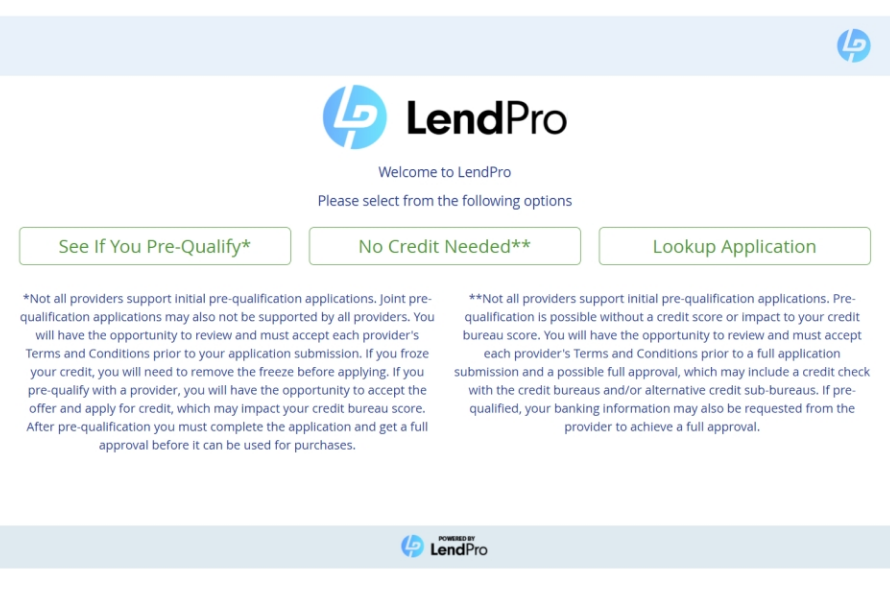
At every entry point the shopper picks a path: See If You Pre-Qualify, No Credit Needed (which skips the primary lenders and goes straight to no-credit-needed providers) or Lookup Application to return to an existing application.
For developers: LendPro can launch a hosted application from your POS through the Launch API, which returns a secure link; ask which systems are supported today. POS Sync sends results back to the merchant system. Additional integration options may be available for specific needs. Discuss your workflow, required data, and implementation requirements with LendPro during an integration call. See developers. Furniture retailers on STORIS get this inside the POS through LendPro 2.0 for STORIS, and auto service shops reach it through 1stMILE.
What happens after a shopper pre-qualifies?
- The shopper completes the registration form. It asks for name, date of birth, SSN or ITIN, cell phone, address, housing status, yearly income, email and estimated purchase amount, plus consent for a soft pull.
- The merchant's setting routes it. By default the application reaches several lenders in the lineup at once; in the traditional waterfall setting it runs prime first, then secondary (near prime), then No Credit Needed. LendPro uses a financing flow configured for each location based on the lenders assigned to that location and the requirements of those programs. Contact LendPro to review configuration changes.
- The shopper sees pre-qualified offers. Each offer shows the provider's name and a pre-qualified amount, subject to the lender's final approval. In the default setting, offers from more than one provider can show side by side. A lease-to-own offer is presented as lease-to-own. Lease-to-own is a rental-purchase agreement, not a loan. Total cost is higher than the cash price.
- The shopper selects an offer. She sees the provider's confirmation with the available limit.
- She completes the provider's full application. Employment, debit card and/or bank details may be required. She agrees to the provider's terms and submits. The lender may run a hard inquiry at this step.
- The merchant finalizes the sale in LendPro. The associate creates the invoice, the shopper e-signs in store or by text or email link, and the merchant processes settlement on delivery. Results can sync back to the store system through POS Sync where integrated.
- A higher amount means a new application. If she wants a bigger purchase after an approval, she starts a new application.
The store does not have to wait for the shopper to come back. LendPro notifies the store when a customer applies, from any entry point, and for 30 days after pre-qualification LendPro marketing tools help pre-qualified shoppers return to complete the lender's full application; the lender makes the final decision. This outreach happens with the shopper's consent; shoppers can opt out at any time (reply STOP to texts). See store alerts and follow-up marketing.
Pre-qualification is not a guarantee of approval. LendPro is not a lender. Lenders make all credit decisions and set all terms.
What should associates say at the counter?
Words matter more than the tablet. These scripts keep it simple, honest and consistent. Adjust them to your store voice, and have your compliance lead approve the final version.
Early in the visit
"Before we fall in love with anything, want to see what you pre-qualify for?"
When the shopper hesitates on price
"A lot of our customers spread this out. I can show you a monthly payment and what you'd likely be offered."
Handing over the tablet or QR code
"You fill this in privately. It checks several lenders at once, and you'll see each lender's name and terms before you decide anything."
That line fits LendPro's default multi-lender setting. If your store uses the traditional waterfall, say: "It checks our lenders in the order we've set, and you'll see each lender's name and terms before you decide."
When the shopper would rather skip the banks
"You can tap No Credit Needed. Those providers' applications may include a check with the credit bureaus or other credit sources, and you'll see their terms before you sign."
Sending a text link
"I'll text you a secure link. Fill it out when it's convenient, and we'll go over your options when you come back."
When the result is lease-to-own
"This option is lease-to-own. It's a rental-purchase agreement, not a loan, and the total cost is higher than paying cash. Here's the total and the early purchase options so you can compare."
When she wants the bigger set
"We can start a new application for the higher amount."
When there's no offer
"The lenders didn't return an offer today. You may get a notice from the lender explaining why. Let's look at what works for you right now."
Bring your current lenders. We will show how LendPro would be configured for your stores.
What language should you use and avoid?
| Say | Avoid | Why |
|---|---|---|
| "See if you pre-qualify" | "You're approved" or "Everyone's approved" | Pre-qualification is not a final approval, and lenders decide |
| "You pre-qualified for $2,000, subject to the lender's final approval" | "You're approved for $2,000" | A pre-qualified amount is not an approval |
| "Checking uses a soft pull where the lender offers pre-qualification" | "No credit check" | A soft pull is a credit check; a hard inquiry may follow if the shopper accepts |
| "No Credit Needed options" | "No credit check financing" | The provider's full application may include a check with the credit bureaus and/or alternative credit sources |
| "Offered by [lender name]" | "Our financing" or "store credit" when a lender provides it | The lender is the creditor or lessor, not the store |
| "Lease-to-own, a rental-purchase agreement, not a loan" | Calling lease-to-own a loan or "no-interest financing" | Lease-to-own costs more than the cash price and has its own disclosures |
| "Terms depend on the lender and your credit" | Quoting a rate or payment before the result | Each lender sets its own terms |
| "Options for many credit types" | "Guaranteed approval" or "approved with any credit" | No approval is guaranteed |
General guidance, not legal advice. Advertising rules for credit and lease-to-own vary by state and by product. Use each lender's required disclosures and review store materials with your counsel.
How do you roll out embedded pre-qualification?
- Put it on every product page above a set price. Near the price, not in the footer.
- Set up tablets or kiosks where shoppers pause. Design centers, mattress galleries, service counters. See kiosks and devices.
- Print QR codes on tags and signs. Use the same compliant headline everywhere.
- Turn on text links for every associate. Especially for phone leads and repair estimates.
- Connect the POS where you can. Where POS Sync is integrated, results flow into the order and associates don't re-key.
- Train with the scripts above. Role-play the lease-to-own, No Credit Needed and no-offer conversations.
- Review weekly by associate. Turn on Employee Tracking so the Daily Applications and Sales Performance reports show who offers pre-qualification and who doesn't.
LendPro helps retailers add pre-qualification to their website product detail pages at no additional cost: a See If You Pre-Qualify button, payment estimates and "as low as" monthly payments on product cards, each linking to the store's LendPro application. Abdul Furniture in Corona, NY is an example: its product pages show a See If You Pre-Qualify button, "See your payment estimate" and "As low as $29.10/mo"* on product cards, and it has a dedicated financing page. See AEO financing pages and product-page financing.
*Example only. Payment estimates are examples only; lenders set APR, term and payment based on approval.
LendPro's go-live SLA is 10 business days. Timing depends on lender activation and integration scope, and custom integrations take longer. LendPro confirms the start date and prerequisites during onboarding.
Lease-to-own is a rental-purchase agreement, not a loan. Total cost is higher than the cash price.
What mistakes do retailers make with pre-qualification?
- Hiding the offer. A link in the footer or a line on the receipt isn't embedded. Put it next to the price.
- Using it only at the register. The value is in the early answer. At checkout it's just an application.
- Overpromising. Calling a pre-qualified amount an approval before a lender decides creates complaints and chargebacks.
- One lender behind the button. Pre-qualification with one lender returns one answer. A multi-lender lineup behind it can return more offers to more shoppers.
- Skipping the full process. A pre-qualified shopper still completes the provider's application, and the store still invoices, collects the e-signature and processes settlement on delivery.
- No follow-up. Shoppers who pre-qualify and leave are warm leads. LendPro can re-engage them on behalf of the merchant that created the lead through SPLICE Software Data-Driven Dialogs (text, chat, call, email, voice), part of LendPro's 30-day follow-up marketing. This outreach happens with the shopper's consent; shoppers can opt out at any time (reply STOP to texts).
How does LendPro embed pre-qualification for retailers?
LendPro is not a lender; lenders make all credit decisions and set all terms. One registration form reaches the lenders configured for your location and channel, drawn from 18+ lenders and 25+ lending programs, from your site, your floor devices, a QR code, a text or your POS. Start with the waterfall settings. LendPro's go-live SLA is 10 business days.
Book a live demo to see the shopper screens.
Running a B3 storefront? See B3 Cloud Commerce financing with LendPro.
Frequently asked questions
What is embedded pre-qualification?
A financing check placed inside the retailer's own product pages, tablets, QR codes, text links or POS, so shoppers see likely offers before checkout.
Does pre-qualification affect my credit score?
Where the provider supports pre-qualification, it uses a soft pull and won't affect credit scores. A lender may run a hard inquiry if the shopper accepts an offer.
Is pre-qualification the same as approval?
No. Pre-qualification shows a pre-qualified amount, subject to the lender's final approval. The lender decides after the shopper completes the provider's full application and agrees to its terms.
What information does a shopper enter?
Name, date of birth, SSN or ITIN, cell phone, address, housing status, yearly income, email and estimated purchase amount. The provider's full application may also ask for employment, debit card and/or bank details.
Do all lenders offer pre-qualification?
No. Some providers do not offer a pre-qualification pathway, and their offers come from the provider's own application.
Can shoppers pre-qualify on their own phone in the store?
Yes. A QR code or a text link opens the form on the shopper's phone, which many shoppers prefer for privacy.
What is the difference between embedded pre-qualification and a lender's pre-qualification page?
A lender's page checks one lender. Embedded pre-qualification lives in the retailer's experience and, with LendPro, reaches the lenders in that retailer's lineup, drawn from 18+ lenders and 25+ lending programs.
Can pre-qualification results flow into my POS?
Yes, where the POS is integrated. LendPro's POS Sync API sends results back to the merchant system, and LendPro 2.0 is embedded in STORIS.
What if the offer is lease-to-own?
The shopper should see clearly that the offer is lease-to-own before choosing. Lease-to-own is a rental-purchase agreement, not a loan. Total cost is higher than the cash price.