
Outreach follows the shopper's consent, and shoppers can opt out at any time.
Key takeaways
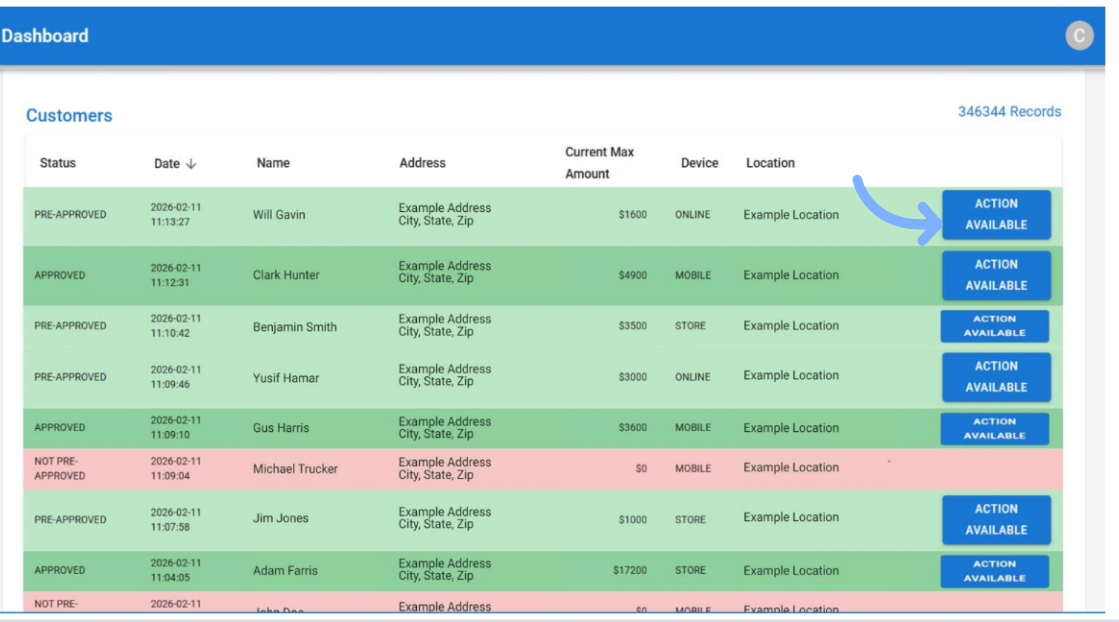
- LendPro notifies the store when a shopper applies through any channel the store offers.
- For 30 days after pre-qualification, LendPro marketing tools help a pre-qualified shopper return to complete the lender’s full application with the store that created the lead; the lender makes the final decision.
- LendPro markets to past applicants, inviting them to re-apply and buy again with the store.
- A pre-qualified amount is subject to the lender’s final approval and is not a guarantee of approval.
Does LendPro notify the store when a customer applies?
Yes. Whenever a shopper applies for financing with your store, LendPro notifies the store, whatever channel the application came from:
- Your website and product pages, through embedded pre-qualification
- The sales floor, a kiosk, a tablet or the counter
- A text link or QR code an associate sends
- The store finder, when the store is listed
An associate knows who applied, so they can reach out while the shopper is still deciding. Applications also appear in the Daily Applications report in the merchant portal, by location, associate and initial lender.
How does LendPro turn a pre-qualified shopper into a sale?
Many shoppers pre-qualify and leave without buying. For 30 days after pre-qualification, LendPro marketing tools help that shopper return to complete the lender's full application with your store. The lender makes the final decision:
- Reminders of the offer. The shopper hears that they pre-qualified, for how much, and how to finish the application.
- Several channels. Through SPLICE Software Data-Driven Dialogs, outreach runs by text, chat, call, email and voice.
- On behalf of your store. LendPro re-engages the shopper for the merchant that created the lead.
Pre-qualified amounts are subject to each lender's final approval. Pre-qualification is not a guarantee of approval.
How does LendPro bring back customers who applied before?
A shopper who applied months ago is one of the best prospects a store has. LendPro markets to past applicants, inviting them to re-apply and come back to buy again. That turns your application history into repeat business: a second room of furniture, the next set of tires, an anniversary gift.
We will walk through your lenders, tiers and entry points in a live demo.
Why does follow-up matter for financed sales?
A financed sale is often lost after the shopper walks out, not at the counter. The shopper pre-qualified, wanted to think about it, and nobody followed up. Store alerts, a 30-day conversion window and past-applicant marketing help close that gap, with LendPro running the outreach for the store. It is the part of financing intelligence that happens after the application.
How does follow-up work with the rest of LendPro?
- The shopper applies once. One application reaches the lenders in your lineup, multi-lender by default or in your waterfall order.
- Your store is notified. An associate can follow up right away.
- The 30-day window starts. Pre-qualified shoppers get reminders and a path to finish their application.
- The sale closes in LendPro. Invoice, e-sign and settlement happen in the LendPro portal.
- Past applicants come back. Re-apply and re-purchase campaigns keep the relationship going.
What about consent and privacy?
Outreach follows the shopper's communication preferences and LendPro's SMS terms, and shoppers can opt out. LendPro holds a SOC 2 report; see security. LendPro is not a lender; lenders make all credit decisions and set all terms.
Frequently asked questions
Does LendPro notify my store when a customer applies?
Yes. LendPro notifies the store whenever a shopper applies through any channel: website, product page, in store, kiosk, text link, QR code or the store finder.
How long does LendPro follow up with a pre-qualified shopper?
For 30 days after pre-qualification, LendPro marketing tools help the shopper return to complete the lender's full application with the store that created the lead. Outreach follows the shopper's consent, and the lender makes the final decision.
Does LendPro market to customers who applied before?
Yes. With the shopper's consent, LendPro markets to past applicants, inviting them to re-apply and re-purchase with the store. Shoppers can opt out at any time.
Which channels does LendPro use for follow-up?
Through SPLICE Software Data-Driven Dialogs, follow-up can run by text, chat, call, email and voice, following the shopper's preferences and opt-outs.
Is a pre-qualified shopper approved?
No. A pre-qualified amount is subject to the lender's final approval. Follow-up helps the shopper finish the full application.