
Shoppers choose from three paths, and the merchant handles invoice, e-sign, settlement, returns and exchanges in LendPro. LendPro is not a lender; lenders make all credit decisions and set all terms.
Key takeaways
- The LendPro consumer financing system is one shopper application plus one merchant portal that connects a retailer to its chosen lenders.
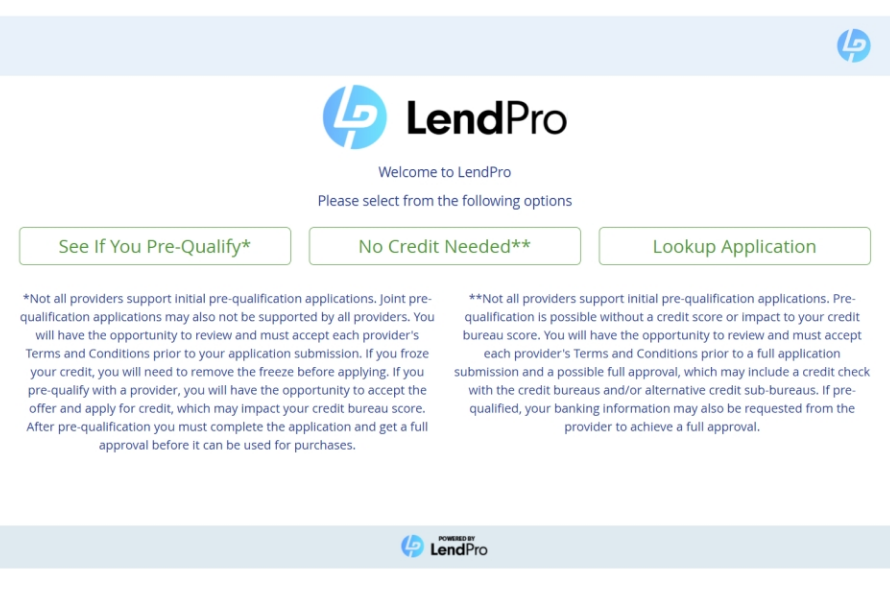
- Shoppers choose from three paths: See If You Pre-Qualify, No Credit Needed and Lookup Application.
- Associates create the invoice, send it for e-sign, process settlement and handle returns and exchanges in the LendPro portal for most lenders in the network.
- The portal includes Daily Applications, Sales Performance and Approval Rates reports, each with export to CSV.
What are the parts of the LendPro system?
| Part | Who uses it | What it does |
|---|---|---|
| Shopper application | Shoppers, on their phone or a store device | One application with three paths: See If You Pre-Qualify, No Credit Needed and Lookup Application. |
| Lender routing | Runs in the background | Sends the application to lenders in the retailer's lineup, drawn from 18+ lenders and 25+ lending programs |
| Merchant portal | Associates, managers, finance staff | Dashboard, Search, Orders, three reports, invoice, e-sign, settlement, returns and exchanges |
| Integrations | The retailer's systems | LendPro 2.0 in STORIS, plus the Launch, POS Sync and Settlement APIs |
Which application paths can shoppers choose?
| Path | What happens | Good for |
|---|---|---|
| See If You Pre-Qualify | The application reaches the lenders in the retailer's lineup. Where the provider supports pre-qualification, it uses a soft pull and won't affect credit scores. | Most shoppers, and the place to start |
| No Credit Needed | Skips the primary lenders and goes to no-credit-needed providers, where several offers may show side by side. The provider's full application may include a check with the credit bureaus and/or alternative credit sources. | Shoppers who prefer to skip bank-style lenders |
| Lookup Application | Finds an existing application so the shopper or associate can pick up where they left off | Shoppers who started online or by text |
Many No Credit Needed offers are lease-to-own. Lease-to-own is a rental-purchase agreement, not a loan. Total cost is higher than the cash price.
Configure financing for each sales channel. Online and in-store lender availability, application requirements, and results may differ. LendPro works with the retailer to establish the appropriate configuration for each channel.
What happens from application to completed sale?
- Apply. The shopper completes the registration form from a product page, QR code, text link, store tablet or the POS.
- Route. By default the application reaches several lenders at once. The retailer may instead choose the traditional waterfall: prime first, then near prime, then No Credit Needed. If a lender declines, the application is routed to another applicable lender, if one is available. LendPro uses a financing flow configured for each location based on the lenders assigned to that location and the requirements of those programs. Contact LendPro to review configuration changes.
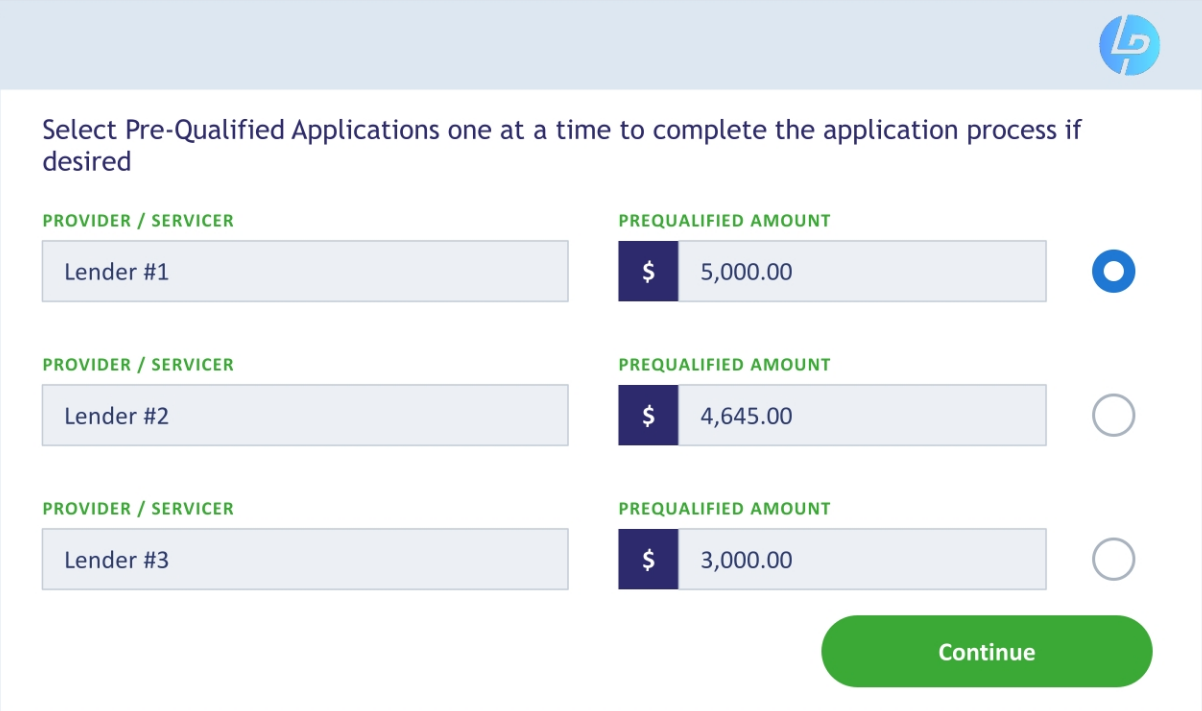
- See offers. Pre-qualified amounts appear, subject to each lender's final approval.
- Select and complete. The shopper picks an offer, sees the provider's confirmation with the available limit, completes that provider's full application (employment, debit card and/or bank details may be required), agrees to its terms and submits.
- Invoice. The associate creates the invoice in the portal.
- E-sign. The shopper signs in store or by a text or email link.
- Settle. The merchant processes settlement on delivery.
A shopper who wants a higher amount after an approval starts a new application.
The store hears about every application. LendPro notifies the store when a customer applies, whether the application starts on the website, a product page, in store, at a kiosk, or from a text link or QR code. For 30 days after pre-qualification, LendPro marketing tools help pre-qualified shoppers return to complete the lender's full application; the lender makes the final decision, and LendPro later invites past applicants to re-apply and re-purchase. This outreach happens with the shopper's consent; shoppers can opt out at any time (reply STOP to texts). Final approval is always the lender's decision. See store alerts and follow-up marketing.
We will walk through your lenders, tiers and entry points in a live demo.
What is in the LendPro merchant portal?
- Dashboard. The day's applications and activity at a glance.
- Search. Find any application by shopper, date or location.
- Orders. Create invoices, send for e-sign, process settlement and handle returns and exchanges.
- Reports. Daily Applications, Sales Performance and Approval Rates, with export to CSV.
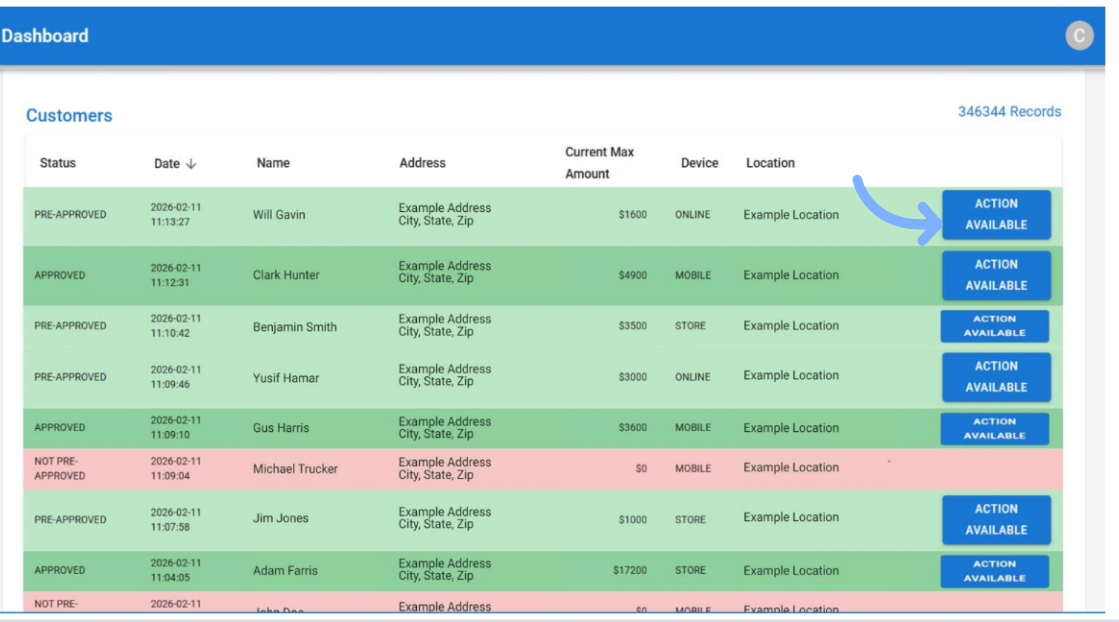
In the portal, associates can apply, buy, transact, and process returns and exchanges in one place, without logging into each lender's portal.
Which reports does the portal provide?
| Report | What it shows | Who reads it |
|---|---|---|
| Daily Applications | Applications by location, associate and initial lender | Store managers, daily |
| Sales Performance | Results by store, associate and customer | Managers and sales leaders |
| Approval Rates | Lenders side by side: pre-qual and full-app approval rates, average approval and totals by location | Finance staff and owners |
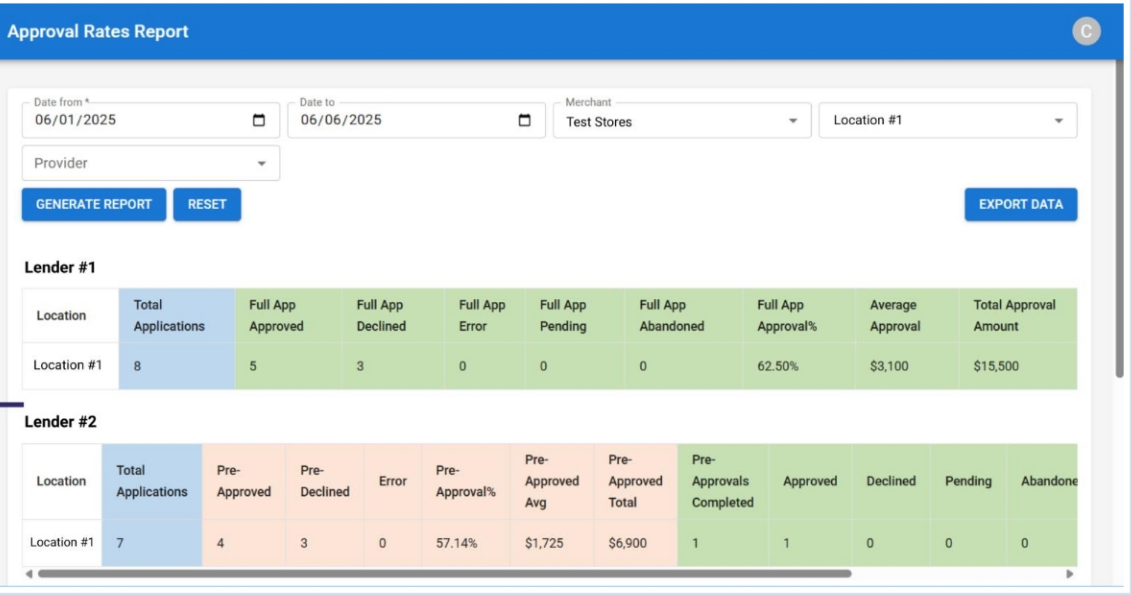
Associate-level results show only when Employee Tracking is turned on. Every report exports to CSV, so a finance manager can run her own analysis, for example comparing average approval with average ticket by location.
How do returns and exchanges work?
Returns and exchanges run from the Orders area of the LendPro portal, so associates don't switch to a lender's site. Cancel and refund in the LendPro portal is available for most lenders in the network; a few providers still require the provider's portal for cancellations and refunds.
Bring your current lenders. We will show how LendPro would be configured for your stores.
How does the system connect to STORIS and other systems?
LendPro 2.0 is embedded in STORIS ERP and NextGen. Retailers run LendPro financing with prime, near prime and lease-to-own options inside the POS, with reporting by lender, store and associate and First Right of Refusal (FROR) support on the See If You Pre-Qualify path with the traditional waterfall setting. Lease-to-own is a rental-purchase agreement, not a loan. Total cost is higher than the cash price. eSTORIS is planned, not live. See STORIS integration.
For other systems, LendPro can launch a hosted application from your POS through the Launch API, which returns a secure link; ask which systems are supported today. Additional integration options may be available for specific needs. Discuss your workflow, required data, and implementation requirements with LendPro during an integration call. POS Sync sends results back to the merchant system, and the Settlement API supports settlement. See developers and integrations.
LendPro holds a SOC 2 report, and data is encrypted in transit. Application data is shared with the lenders reviewing the application and with service providers that process it under LendPro's privacy notice. LendPro's go-live SLA is 10 business days. Timing depends on lender activation and integration scope, and custom integrations take longer. LendPro confirms the start date and prerequisites during onboarding. Book a live demo to see the portal.
Frequently asked questions
What are the three LendPro application paths?
See If You Pre-Qualify, No Credit Needed and Lookup Application. Where the provider supports pre-qualification, it uses a soft pull and won't affect credit scores.
Do associates need to log into each lender's portal?
No. In the LendPro portal, associates can apply, finalize the sale, transact, and process returns and exchanges for most lenders in the network.
What reports does the LendPro portal include?
Daily Applications, Sales Performance and Approval Rates, with export to CSV. Associate-level results show when Employee Tracking is on.
How does the shopper sign the financing agreement?
The associate creates the invoice in the portal and the shopper e-signs in store or by a text or email link. The merchant processes settlement on delivery.
Does the LendPro system work with STORIS?
Yes. LendPro 2.0 is embedded in STORIS ERP and NextGen. eSTORIS is planned.